How it works
Privacy and security
This page sets out Ovillo's privacy in detail: the encryption, what stays on your Mac, exactly what can leave when you use the assistant, how much of the personal detail the scrubber catches, and what the app cannot protect you from. It is for anyone deciding whether to trust it with a family's papers.
Encryption
Your passphrase never leaves the page. From it, the page derives a key and uses it to encrypt everything before it is saved.
- Passphrase to key: PBKDF2 with SHA-256, 310,000 iterations, and a random 128-bit salt. The page derives the key as non-exportable, so it cannot be read back out of the browser engine. The passphrase must be at least 12 characters.
- Encryption: AES-256-GCM, with a fresh random 96-bit value for every write. GCM also fails decryption if the ciphertext was changed.
- The envelope:
vault.jsonis a JSON envelope holding the ciphertext plus the format version, schema version and key settings, which are not secret. Those settings are bound into the encryption, so they cannot be altered without decryption failing. An envelope with an iteration count outside 310,000 to 1,000,000 is refused. - Documents: each original is encrypted on its own under the same key, with the file's id bound in so files cannot be swapped between ids.
- Backups are the same encrypted envelope, in a file you save. They need the same passphrase, and restoring shows a preview before anything changes.
The local server holds only ciphertext. It checks the shape of an envelope but cannot read it, and never receives a passphrase or a key. See Architecture for the layout on disk.
Important. There is no password recovery. Nobody, including the people who make Ovillo, can open a vault without its passphrase. If you lose it, the record is lost. Keep an encrypted backup somewhere safe, and keep the passphrase somewhere other than the same computer.
What never leaves your Mac
With no assistant connected, your documents, record, search index and every model run on the Mac, and nothing is sent anywhere. The one exception is the update check below, which carries no record data. Always, whatever you connect:
- your passphrase and the key;
- the plaintext record, which reaches the local server only as ciphertext;
- the text read from your documents, the search index, and the name and search models' work;
- dictation audio, which is turned into text on the Mac.
There is no Ovillo account and no analytics, and no crash reporter is built in. Reading and search work offline.
The update check
The Mac app checks github.com/BraedenBDev/ovillo-releases for a newer version when it starts, and every six hours while it is open. GitHub learns the app version and your computer's IP address. Nothing from your record is sent. It runs whether or not a vault is unlocked and whether or not an assistant is connected. A downloaded update installs only when it carries the same Developer ID signature as the running app, so a swapped file cannot install unsigned code. The record is not touched by an update.
The assistant path
If you connect an assistant (The assistant), the page sends it text. The path is fixed:
- Every request goes through one function,
agentStepin the page. Nothing else may reach a provider. - Find names. The local name model, and Apple's name tagger when the helper is ready, look for people written without a title and teach the scrubber.
- Scrub.
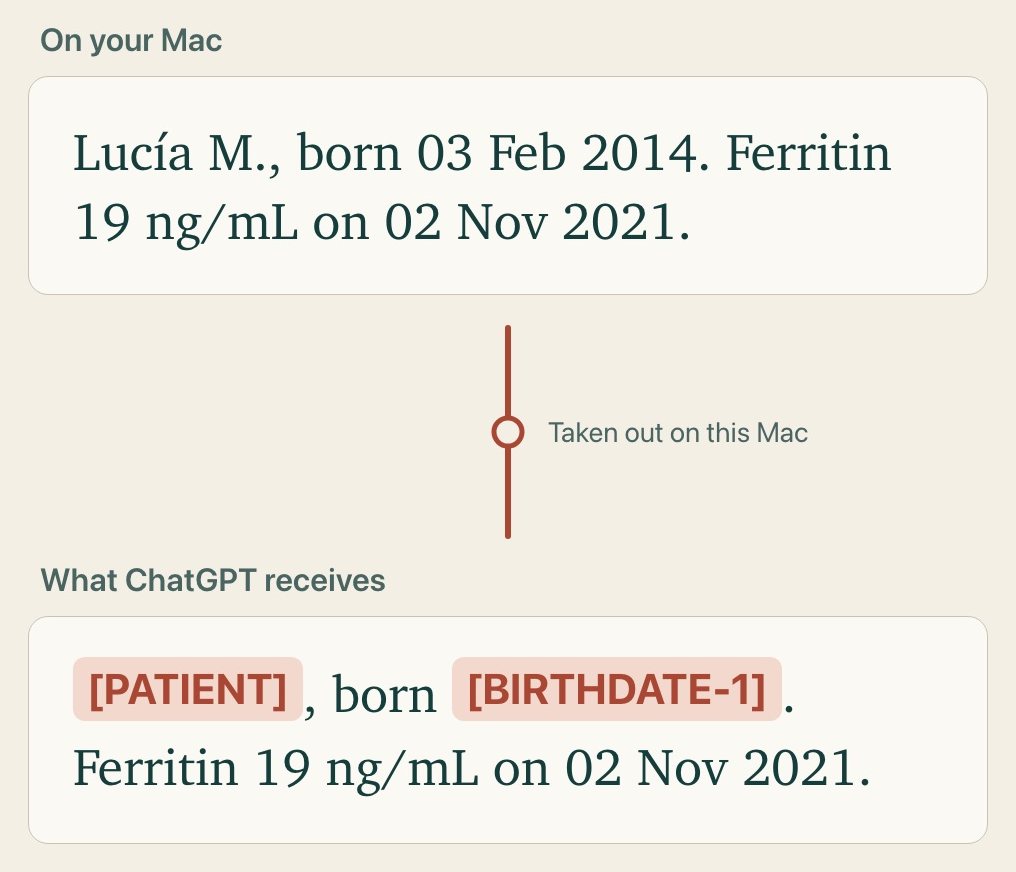
scrubMessagesreplaces names, phone numbers, emails, street addresses, birth dates and labelled ID numbers with placeholders such as[PATIENT]or[PERSON-1]. The same person gets the same placeholder throughout a session. The table of who is which lives only in memory. - Send. The page hands the scrubbed conversation to the local server, which forwards it to OpenAI (Sign in with ChatGPT) or to the HTTPS address of your own key. Provider tokens and keys arrive with each request and are not stored by the server.
- Restore. The reply and any tool inputs are turned back into the real details on your Mac.
The provider sees the scrubbed text in plain form, under your own account. If you use OpenRouter, it passes the text to the company that makes the model you picked. Each request is recorded in the app, so you can see exactly what was last sent.
Dates of results, lab values, doses, medicines and facility names are deliberately not replaced, because the assistant needs them. Held names and birth dates are sent coded, and every rendering of a known birth date (such as 2/3/2018, 2 March 2018 or 2 de marzo de 2018) is coded by value.
Original files
Important. Scrubbing works on text. A file's bytes cannot be scrubbed, so an original file is sent only when you allow it, one document at a time.
The details:
- The
read_documenttool returns the text Ovillo read on your Mac, which then goes through scrubbing like everything else. - The original is considered only when a document has no readable text (fewer than 40 letters and digits across its pages) or the assistant asks to see the layout. Ovillo then shows Send the original file? and waits for you. Don't send is the default focus; Escape, locking the vault or two minutes without an answer all count as no.
- Before any request leaves,
scrubMessagesremoves every file or image block that you did not allow in this session, so a file can only go out after your click. A file you allow (a PDF up to 20 MB, or a photo) goes as it is, with nothing in it replaced, and the PDF goes under a neutral name, not its file name. Ovillo asks every time; nothing is remembered. With your own API key, only photos can go this way; a PDF is replaced by a note to work from its text. - Automatic reviews never ask. A document that would need its original stays waiting until you start a review yourself, from the panel or from Review.
- A password-protected PDF you unlocked is always sent as text read on your Mac, never as the file.
- A document held as someone else's is closed to the assistant, and is checked at the moment it is read.
- The consent you tick before connecting says this: an original file leaves the computer only when you click Send for that document, each time you are asked, and never during an automatic review.
If a file must never leave, do not connect an assistant, or turn it off while that person's record is open.
How well scrubbing works
Not completely. The scrubber is tested by hand against MEDDOCAN, a set of made-up Spanish clinical cases (Zenodo 4279323, CC-BY-4.0). The measurement used the first 250 test cases and 5,661 marked-up details, on 8 November 2026. A detail counts as covered when it no longer appears in the scrubbed text.
| Kind of detail | Covered | Recall |
|---|---|---|
| Patient name | 498 of 502 | 99.2% |
| Clinician name | 501 of 501 | 100.0% |
| Patient ID (DNI, NHC and similar) | 269 of 283 | 95.1% |
| 248 of 249 | 99.6% | |
| Phone number | 25 of 26 | 96.2% |
| Street | 325 of 413 | 78.7% |
| Dates | 247 of 611 | 40.4% |
| Hospital | 15 of 130 | 11.5% |
| Territory (places) | 40 of 956 | 4.2% |
| Patient age | 0 of 518 | 0.0% |
| All kinds together | 2,641 of 5,661 | 46.7% |
How to read it:
- Targeted: people's names, emails, phone numbers, street addresses, labelled ID numbers, and birth dates. The patient name and ID rows were improved on 8 November by reading a "Nombre" line beside an "Apellidos" line as one person and coding labelled identifiers and long digit runs; the dates, street, hospital, territory and age figures are from the earlier measurement and did not change. The patient-name figure assumes you entered every part of the name or the document has labelled name fields; a first name only in running text still depends on the name model.
- Not targeted: ages, places (towns, regions), hospitals and facility names, and other kinds of detail. That is why the overall figure is low. Dates of results are kept on purpose; birth dates are coded when known or labelled, and the dates row mixes both kinds.
- Two name finders: on a Mac with the helper ready, a second finder adds names. On the same cases the union reached 99.6% on patient names and 49.4% overall, and over-scrubs more, since Apple's tagger also marks places and hospitals as people.
- The figures measure the whole scrubbing step on Spanish text, not the name model alone. English text and real documents with real layouts will differ.
A name with no title can slip through when the name model could not run, and the privacy panel says so for that session. So think of scrubbing as lowering what the provider learns, not as a promise that no personal detail gets through.
Prompt injection
A document is written by other people, so it may contain text meant to steer the assistant ("approve everything"). Ovillo's defences are layered:
- Fenced data. Every document-reading tool wraps text in a
<document-text>fence, a closing tag inside the text cannot end the fence early, and the assistant's instructions say text inside it is data. That part rests on the prompt, not on code. - The injection scanner.
src/injection.mjslooks for a fixed list of phrases addressed to an assistant, in English and Spanish ("ignore previous instructions", "approve all", "olvida las instrucciones", and similar). A page that matches is flagged on its card or Documents row. It flags and does not block, and a flagged page is never handed to the assistant for a decision. - The fixed list is a limit. A paraphrased instruction is not flagged. That is why releasing a held document is limited to the hard-to-read state, and every approval needs a quote the app finds on the page.
- Reading is not writing. What a steered model can do is bounded by the code: it can raise items for review, file only routine ones that pass every check, and decide held items under the rules in How the record is built. It cannot delete, export, change settings or move anything between people.
Risks that remain
- Malware, or a compromised Mac. Encryption protects the files at rest. Software running as you, a browser extension, a keylogger or screen capture can read what is on screen, and the decrypted record is in memory while the vault is unlocked.
- An unlocked app. Anyone at the keyboard can read it. Lock when you step away. The default auto-lock is 5 idle minutes; it can be set to never, which leaves the vault open until you press Lock vault.
- Plaintext exports. Appointment brief downloads, the plaintext JSON download and printouts leave the vault. They cannot be recalled or revoked.
- A weak passphrase. PBKDF2 slows guessing but does not stop it. There is no memory-hard function and no hardware-keystore wrapping, so a short or common passphrase can be guessed offline by someone who copies the files.
- Device loss. There is no cloud copy and no sync. If the Mac fails and you have no backup, the record is gone. A backup in the wrong hands is as protected as your passphrase.
- Filenames after unlock. Filenames are encrypted at rest but visible on screen, which can reveal health context to someone looking.
- The update signing key. Whoever holds the Developer ID certificate can ship an update that installs itself. It is kept in one Mac's keychain.
- Crashes. A crash between your change and a confirmed save can lose the last change; the app reports a save failure it can see. A save made against a vault changed in another window is refused instead of overwriting.
- Not medical advice. Ovillo is a notebook. It is not a medical device, and it has no regulatory clearance or independent audit.
Reporting a security issue
Write to possible@almostimpossible.agency. Say what you found and how to reproduce it. Please do not attach real patient documents or send your passphrase; a description or a made-up example is enough. A screenshot of the app helps.
Something unclear or out of date? Tell us on GitHub.